
Best student laptops by course (2026): what your degree changes, and what it doesn't
By Alex Sheridan · Updated 1 October 2026
Links with an * may help pay for UniSorted.

Every course group chat has the same message in it by the second week of September. Someone a year above tells the freshers that for this degree you really need some specific, expensive thing, and forty people add three hundred pounds to a budget that was already tight. Some of it is right. A lot of it is last year's marketing passed along third-hand, and it talks people into money they didn't need to spend.
For most degrees, your course doesn't change the answer at all. The laptop a history student should buy is the laptop a law student should buy is the laptop most computer scientists should buy. Only three kinds of course really move the decision.

After freshers' week
The At Uni pack is mostly about making the January loan payment last until April, and what to do if it doesn't.
Leave the box empty and you'll just get the PDF. Unsubscribe any time.
What you could buy on 16 September
Before I sent anyone shopping I checked the live price and stock of the laptops I was about to name, first in early September and again on 16 September. In the August version of this guide, the pick for most courses was an ASUS Vivobook 15 with a Core i5 and 16GB of RAM at around £426, cheaper than the 8GB models next to it. By 16 September it had gone from every listing I checked. The two ASUS Vivobook 15s actually on sale were an 8GB Core i3 at £425.99, in stock, and an OLED model at £499.99 with four left, and neither is a 16GB laptop at £426. The Lenovos and Acers I'd have pointed coding and budget students at were all out of stock.
That isn't a one-off. Our budget laptops guide found the same thing the same week: at the cheap end right now the new listings sell you 8GB, and a new 16GB machine at around £425 has largely stopped existing. So the honest general-course answer has shifted. For most degrees you still want the cheapest machine you can find with 16GB of RAM, a real SSD and a brand you've heard of, exactly as before. What has changed is where you find it. For most degrees that is either the current cheapest-in-stock 16GB pick, which the budget guide tracks live because it moves week to week, or a reconditioned business laptop, which is where a reliable 16GB machine now hides at the budget end.
The three courses that change the answer
There are exactly three situations where your subject earns a different, and usually pricier, machine. If your course isn't one of the three, none of this changes your buy.
If your course runs heavy 3D, CAD or simulation
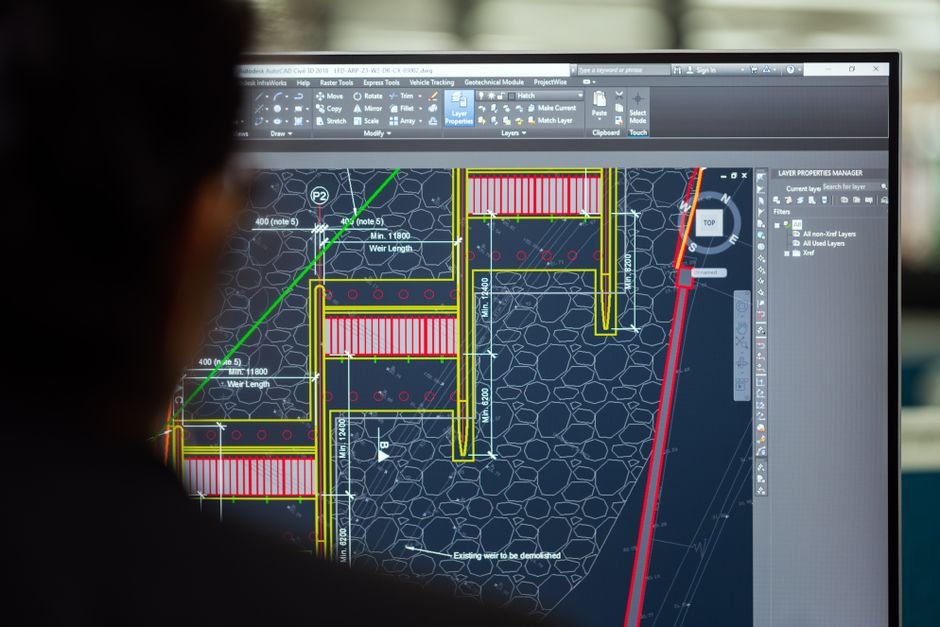
Engineering, architecture, product design and the more serious video and games courses are the real exception, because they lean on software that wants a dedicated graphics chip. In practice that means a gaming-style laptop such as the Acer Nitro V15*, a Core i5 with 16GB and an RTX 4050. In September it was around £890 at Amazon and out of stock. That's roughly double a good general laptop, and with term under way, don't expect it back cheaply. Ask your department first. A lot of courses run CAD and rendering on lab machines, or a remote desktop into them, that are far beefier than anything you'd carry, and they expect you to use them. If yours does, a normal 16GB laptop plus the lab beats a hot, heavy gaming laptop you stop lugging to a 9am by October. If they do expect you to work at home, a dedicated-GPU machine is the floor.
If your course is built around a Mac
Some design, film, music and architecture courses take it for granted that everyone is on macOS, because the studio software and the tutors are. If yours is one of them, don't fight it, but be careful which Mac you buy. Apple's current Air is the M5, and it has gone up since launch: on 1 October Apple's UK store listed it from £1,299, or £1,199 on the Education Store once you verify as a student. The cheaper new Mac, the MacBook Neo, was £599 for students the same day, but every Neo has 8GB of memory that can't be upgraded, which is too little for the Final Cut, Logic and Adobe work these courses tend to set. The value play is still the model the M5 replaced, the M4 Air, which launched at £999 and does everything a course like this needs. New M4 stock has largely sold through, and what turns up on Amazon now tends to be used units with no Apple warranty. For a refurbished M4 with a warranty behind it, Apple's Certified Refurbished store is the safer route, and it will still cost more than any Windows machine here.
If colour is the whole job
Graphic design, photography and illustration are the one course type where a better screen stops being a luxury. You can't grade a photo or match a brand colour on a dim, washed-out panel, and no amount of processor makes up for it. The cheap 16GB laptops the budget guide tracks all have standard FHD screens, and they won't do it. So this is where the money goes: a real OLED panel, where the ASUS Vivobook 15 OLED* is the cheapest way in, or an IPS screen the maker publishes a colour-accuracy figure for. A MacBook Air is the other reliable route, and its panel is the reason a lot of design courses default to one in the first place.
Everything else: the same laptop
For the majority (law, humanities, social sciences, business, maths, most of the sciences, and yes, computer science) the buy is the one from the top of this piece. In practice that means refurbished more weeks than not, because lately the new listings at that price are mostly 8GB. A reconditioned ThinkPad or Dell Latitude is the dependable way to get 16GB near £400. Two subjects come up as supposed exceptions over and over, and mostly aren't.
Computer science students are told they need a powerful machine. They mostly don't. In a Student Room thread called "help me choose a laptop" in mid-September, a fresher asked what to buy, and the reply from a student who codes for their degree didn't mention graphics cards once: "i have 16gb as i have to do coding in my degree which needs the RAM". That's the right priority. What matters is 16GB of memory, a keyboard you can sit at all day, and being able to run Linux or the Windows Subsystem for Linux, which every laptop here does. The heavy compiling and any model training happen on university servers or in the cloud. Any 16GB machine from the budget guide, or a 16GB Lenovo IdeaPad* if one's in stock that week, will handle a degree's worth of code.

Medicine, nursing and anything with long placements is the opposite worry. The laptop lives in a bag on a train or down a ward corridor, so weight and battery matter far more than raw speed. A lighter 14-inch machine, or a used MacBook Air if the money is there, is worth more here than any spec bump. The floor is still 16GB and an SSD, and past that I'd take the lighter machine every time, even if it's slower (nobody on a 7am placement train cares about benchmark scores).
Get the student price, wherever you buy
Two habits save real money on any of these. Run any model through UNiDAYS and Student Beans before you pay full retail, and for anything Apple use the Education Store, which is a standing discount rather than a sale you wait for. The Windows machines leapfrog each other across Amazon, Currys, Argos, John Lewis and Very from one week to the next, so search the exact model name on all of them (the running laptops guide tracks which are cheapest and in stock this month) before you buy the first link you see. And whatever you land on, don't pay for Microsoft Office: almost every UK university gives you Microsoft 365 free the moment you sign in with your student email, so check your uni's IT page before you pay Microsoft a penny.
How we checked this
The prices and stock in this guide were read live from Amazon and Apple's own UK stores in early September and again on 16 September 2026, and the Apple prices were checked again on 1 October 2026. Laptop listings move faster than almost anything else we cover. Expect at least one price above to be wrong by the time you read it.
Jamie writes to people already at uni
When your loan comes in, and what's due before it does. House deposits are the usual one.
You'll also get the At Uni pack as a PDF. Unsubscribe any time.

Ask Alex a question
If this guide didn't cover the thing you came for, ask. If enough people ask the same thing, it becomes a guide.
Read us often? You can add UniSorted as a preferred source on Google.